

-
MP4影音如何嵌入網頁(編輯器)中?
2018/1/31 / 系統說明
- 回上頁

MP4影片自動播放(含手機) 範例
MP4影片一般播放(不含手機) 範例
MP4影片程式碼 範例
程式語法 編輯儲存做法:
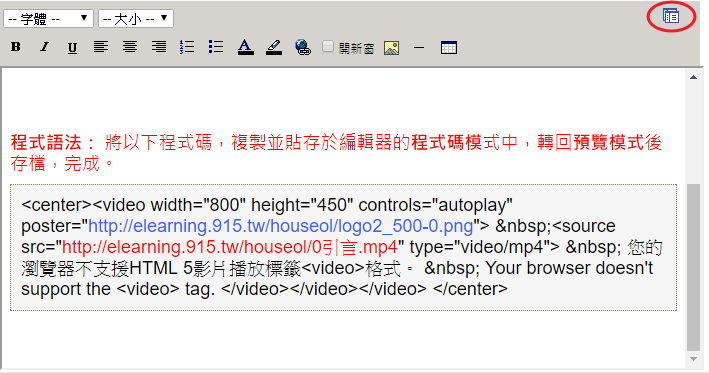
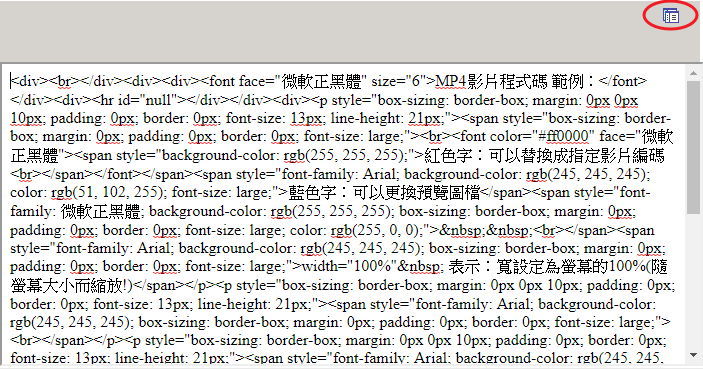
1、將如下程式碼複製並貼存於如下圖編輯器右上角的 切換鈕,
切換鈕,
愛屋自動縮放、自動播放版:如上↑
<div class="header_media with_search_5"><div class="wpestate_header_video full_screen_no parallax_effect_no"><video id="hero-vid" class="header_video" poster="" width="100%" height="100%" autoplay="" muted="" loop=""><source src="https://www.houseol.com.tw/admin/video/1608266435390.mov" type="video/mp4"><source src="" type="video/webm"><source src="" type="video/ogg"></video></div></div>愛屋官網首頁自動縮放、自動播放版:如上↑
<center><div class="moviebox"><video width="100%" height="" autoplay="autoplay" poster="">
<source src="https://d3j06uq18x1o3j.cloudfront.net/local/beecut.com/video/banner.mp4" type="video/mp4">
您的瀏覽器不支援HTML 5影片播放標籤<video>格式。
Your browser doesn’t support the <video> tag. </video></video></video></div></center>愛屋自動縮放版:
<center><video width="800" height="450" controls="autoplay" poster="http://elearning.915.tw/houseol/logo2_500-0.png"> <source src="https://d3j06uq18x1o3j.cloudfront.net/local/beecut.com/video/banner.mp4" type="video/mp4"> 您的瀏覽器不支援HTML 5影片播放標籤<video>格式。 Your browser doesn’t support the <video> tag. </video></video></video> </center>
2、切換為【編輯模式】處理後,
3、再轉回【預覽模式】後再按存檔,
4、完成!
PS.
紅色字:可以替換成指定影片網址連結。
藍色字:可以更換預覽圖檔。
width="100%" 表示:寬設定為螢幕的100%(隨螢幕大小而縮放!)
藍色字:可以更換預覽圖檔。
width="100%" 表示:寬設定為螢幕的100%(隨螢幕大小而縮放!)
【預覽模式】
【編輯模式】
 台灣房仲網會員刊登


